
Recent Articles
Showing posts with label 94fbr. Show all posts
Showing posts with label 94fbr. Show all posts
Sunday, May 25, 2014
Sunday, May 25, 2014
- 0 Comments
Three Working Methods To Hack Whats App - [Updated] [By Digi Hackers]
Hello Friends , Welcome back to Digi Hackers.
Due to Some Reasons Digi Hackers is not that much active as our lovely users expect from it , Sorry For The Inconvenience


Said by Someone once- "Every positive thing has a equivalent negative thing or vice-versa"
Lets Move to Whatsapp Hacking:-
1) Whats App Sniffer

WhatsApp Sniffer is a tool for root terminals to read WhatsApp conversations of a WIFI network (Open, WEP, WPA/WPA2). It captures the conversations, pictures / videos and coordinates that aresent or received by an Android phone, iPhone or Nokia on the same WIFI network.
It has not been tested with Windows Phone terminals.
It can't read the messages written or received by the BlackBerry's, as they use their own servers and not WhatsApp's.
This application is designed to demonstrate that the security of WhatsApp's communications is null.
WhatsApp Sniffer just use the TCP Dump program which reads all the WIFI network packets and filters those which has origin or destination WhatsApp's servers.
All messages are in plain text, so it does not decrypt anything, complying fully with the legal terms of WhatsApp
(3.C: "While we do not disallow the use of sniffers Such as Ethereal, tcpdump or HttpWatch in general, Any we do going efforts to disallow reverse-engineer our system, our protocols, or explore
outside the boundaries of the ordinary requests made by clients WhatsApp .... ")
For WPA/WPA2 encrypted networks, if uses the tool ARPSpoof (optional).
Things You Will Need:-
2) Decrypting The Conversation
1) Whats App Sniffer
WhatsApp Sniffer is a tool for root terminals to read WhatsApp conversations of a WIFI network (Open, WEP, WPA/WPA2). It captures the conversations, pictures / videos and coordinates that aresent or received by an Android phone, iPhone or Nokia on the same WIFI network.
It has not been tested with Windows Phone terminals.
It can't read the messages written or received by the BlackBerry's, as they use their own servers and not WhatsApp's.
This application is designed to demonstrate that the security of WhatsApp's communications is null.
WhatsApp Sniffer just use the TCP Dump program which reads all the WIFI network packets and filters those which has origin or destination WhatsApp's servers.
All messages are in plain text, so it does not decrypt anything, complying fully with the legal terms of WhatsApp
(3.C: "While we do not disallow the use of sniffers Such as Ethereal, tcpdump or HttpWatch in general, Any we do going efforts to disallow reverse-engineer our system, our protocols, or explore
outside the boundaries of the ordinary requests made by clients WhatsApp .... ")
For WPA/WPA2 encrypted networks, if uses the tool ARPSpoof (optional).
Things You Will Need:-
- A Rooted Android Device
- Your victim should use the same wi-fi through which you are connected
- Whats App Sniffer Root v1.03
2) Decrypting The Conversation
Have your victim locked his whatsapp? or you want all his conversation on your PC.
Well Generally for security reasons WhatsApp encrypt Conversation while taking backup in SD Card or Phone Memory.
But i have found a tool on XDA that claims to decrypt all the whatsapp conversation down to your PC.
If you have some access over his device you can also send files from Bluetooth to your device and later read all the conversations.
This tool is called WhatsApp Xtract and for this all credits goes to ztedd
Some general advice on how to backup Whatsapp and get the database file:
Android:-
- In Whatsapp go to settings - more - Backup Chats
- Copy the folder "Whatsapp" on the SD card to your backup location (e.g., PC)
- (ideally also) use the app Titanium Backup to backup the full whatsapp application together with its data, copy the backup from the folder "TitaniumBackup" on the SD card to your backup location (e.g., PC)
- Use this tool Whatsapp Backup Extractor (download in this thread) to show the chats in a friendly readable format. The necessary files "wa.db" and "msgstore.db" you will find inside the Titanium Backup archive "com.whatsapp-[Date]-[some digits].tar.gz", alternatively (without Titanium Backup) you can use the msgstore.db.crypt file from the folder Whatsapp/Databases on the SD card.
iPhone
- use Itunes to create an unencrypted Backup
- use an Iphone Backup Tool to get the file net.whatsapp.WhatsApp/Documents/ChatStorage.sqlite, e.g. I-Twin or Iphone Backup Extractor. Make sure to create an unencrypted backup with Itunes, as these tools can't handle encrypted backups. Another possibility are forensic tools like UFED Physical Analyzer.)
Blackberry
- sync your blackberry with desktop manager and then copy the messagestore.db file from SD
- however, it seems that this file is encrypted? Currently we don't know how to get the unencrypted messagestore.db file
- Blackberry not supported yet!
Nokia
- not known yet
- Nokia not supported yet!
For Further Detail about this Method you can move to this Forum of XDA.
3) Using Spywares
Using 3rd Party Spywares can be very useful for spying not only WhatsApp Conversation but also many things like, you can able to Track GPS Location, you can capture the lock screen passwords and they can be also used for monitoring Websites. there are many spywares in the market but i recommend is BOSSPY.
Friday, May 16, 2014
Friday, May 16, 2014
- 0 Comments
600+ Free Members For Your Facebook Group ~ 17th May 2014 One Step Give-Away
[Digi Hackers-100% Original]

AVG Anti-Virus Definitions May 16,2014 Updater
Hello Friends , Welcome back to Digi Hackers...
Today I want to give you a special updater that is...
AVG Anti-Virus Definitions Updater of today i.e. 16th May 2014
Well guys this is our first definitions updater so be calm and enjoy
This one is for AVG Anti-Virus owners...
AVG Anti-Virus Definitions description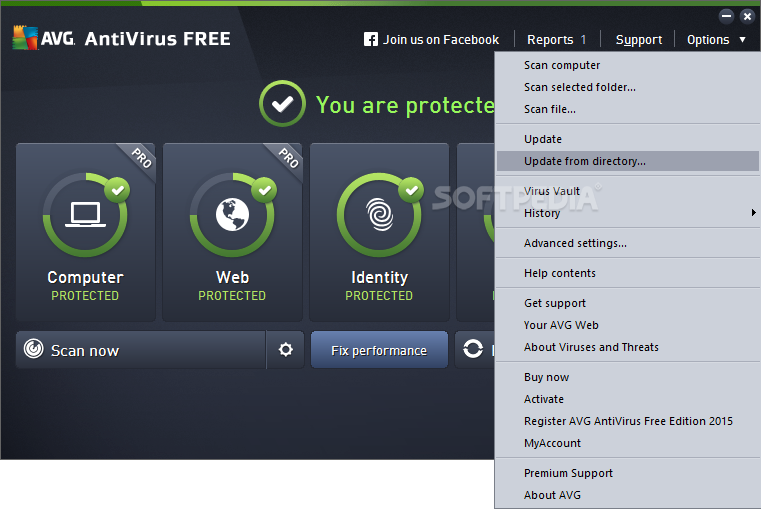 Latest free virus definitons for AVG AntiVirus
In order to provide the highest level of antivirus protection for users of AVG Anti-Virus, GRISOFT continuously develops information about new viruses.
These downloads are for our new version AVG 8.0Download Latest AVG Anti-Virus Here This information, as well as product improvements, is provided to the users
of AVG Anti-Virus in the form of Updates.
Timely virus database updates are the critical component for the effectiveness
of any antivirus program. In order to ensure that your AVG is providing the maximum amount of antivirus protection, your AVG Anti-Virus System must be kept up-to-date.
Save update to a temporary location, open AVG control center, select the update button at the bottom, then the select folder button, and follow the prompts. NOTE: It is strongly recommended that you perform all updates from the AVG Anti-Virus interface. The program can distinguish between full and differential updates; while this page offers only full update files for download.
Downloads:-
TOTAL SIZE/OS SUPPORTED 81.5 / SUPPORTED FOR EVERY VERSION OF WINDOWS |
Saturday, May 10, 2014
Saturday, May 10, 2014
- 0 Comments
SOME OF THE MOST USEFUL ANDROID CODES
Hello Friends Welcome back to Digi Hackers
Well since Android Phone's Decade has just arrived so many android users don't know much about the hidden features of android phones.
 Today we are sharing an article with secret
android tricks and hidden features of android phones.
Today we are sharing an article with secret
android tricks and hidden features of android phones.
Different versions of android versions support different set of android tricks, so try them all
1) Force reboot:
Many times android users face a problem of freezing in mobile phone, in case your android phone is frozen, you can reboot it:Just press Power Button+ Home Key + Volume up button simultaneously.
2) Quick Google Access:
Android phones is built primarily for the Internet, many of Androidusers don’t know that android phones provide a way by which we can access Google search injust a single click:Press menu key and hold it for couple of seconds, it will launch the Google search.
3) Reboot Android in safe mode:
As many computers, we can also reboot Android phones in safe mode. The latest Android- Jelly Bean version provides an option to reboot in safe mode, if something goes wrong.
To reboot your android in safe mode, follow the below given instructions.
*Long press the power button
*Long press on the power off option.
Android phone will show a confirmation message about rebooting it in safe mode, if we reboot android phone in safe mode then all the 3rd party application will be disabled. These applications can again be enabled when we reboot our phone normally.
This is a great Android utility in case when, one of your 3rd party application is causing trouble for you and you want to hunt it.
4) Unlock android phones by face detection:
In the jelly bean version, Android provides a way by which android phone can be unlock using face detection, to make this feature more secure, Jelly Bean version added another layer of protection in which Android phone can be unlocked only when the face is matched as well as we have to blink eyes in order to unlock phone.
Blinking eyes tells the android security system that person is live and it’s not an illegal attempt of unlocking using a still image.
To activate this: Go to Settings > Security > Screen lock > Face unlock.
5) Get detailed information about phone status:
We can get the detailed statistics like phone information, battery information,usage statistics and WiFi information by just dialing *#*#4636#*#* This is a handy USSD to get the details about battery usage, DNS check, Ping, Application time usage time and so on.
6) Move android apps to SD card:
Its good idea to install android apps in SD card, but what if you installed apps on your phone memory. Don’t worry! Android phones provide a way by which we can move our apps to SD card. To move apps to SD card, follow these steps:Go to settings > Application settings > Manage application > Select the application, You will see the option “Move to SD card”.
7) Hard Reset and Factory reset your android phone:
Android phone can be formatted in two ways:
a) Factory reset:
In factory reset, your phone is being formatted to factory level. Means all the settings will go by default and all the internal data will be deleted.
To factory reset a phone dial *#*#7780#*#*.
b) Hard reset:
To hard reset a phone dial *2767*3855#, this will delete all the data (including internal and External SD data) as well as settings of android phone.
Don’t try this code for testing purpose, until you are not sure.
It will not ask for any confirmation.
8)Context menu in android:
Long press on the screen, will show you additional options for customizing android phones. This context menu is some what similar to the right click menu of most operating systems.
9) Taking screen shots on android phone:
Android phones offer a great feature by which we can take the screen shot without using any 3rd party application.
However the screen shot android tricks vary from one android version to another version.
Press the Home button + power button.For Galaxy Nexus: Power button+ volume down button.
For Galaxy Note 2 and S3: Swipe your palm on the screen to take screen shot.
10) Android Version Animation:
Go to settings > about phone > Tab repeatedly on ‘Android version’.
After sometime, the Android version will be animated Recommended for you Analyze WiFi Connections Using WiFi Analyzer Run Ubuntu OS On Android Protecting Applications In Android Best Photo Gallery And Picture Browser For Android.
Well since Android Phone's Decade has just arrived so many android users don't know much about the hidden features of android phones.
Today we are sharing an article with secret
android tricks and hidden features of android phones. Different versions of android versions support different set of android tricks, so try them all
1) Force reboot:
Many times android users face a problem of freezing in mobile phone, in case your android phone is frozen, you can reboot it:Just press Power Button+ Home Key + Volume up button simultaneously.
2) Quick Google Access:
Android phones is built primarily for the Internet, many of Androidusers don’t know that android phones provide a way by which we can access Google search injust a single click:Press menu key and hold it for couple of seconds, it will launch the Google search.
3) Reboot Android in safe mode:
As many computers, we can also reboot Android phones in safe mode. The latest Android- Jelly Bean version provides an option to reboot in safe mode, if something goes wrong.
To reboot your android in safe mode, follow the below given instructions.
*Long press the power button
*Long press on the power off option.
Android phone will show a confirmation message about rebooting it in safe mode, if we reboot android phone in safe mode then all the 3rd party application will be disabled. These applications can again be enabled when we reboot our phone normally.
This is a great Android utility in case when, one of your 3rd party application is causing trouble for you and you want to hunt it.
4) Unlock android phones by face detection:
In the jelly bean version, Android provides a way by which android phone can be unlock using face detection, to make this feature more secure, Jelly Bean version added another layer of protection in which Android phone can be unlocked only when the face is matched as well as we have to blink eyes in order to unlock phone.
Blinking eyes tells the android security system that person is live and it’s not an illegal attempt of unlocking using a still image.
To activate this: Go to Settings > Security > Screen lock > Face unlock.
5) Get detailed information about phone status:
We can get the detailed statistics like phone information, battery information,usage statistics and WiFi information by just dialing *#*#4636#*#* This is a handy USSD to get the details about battery usage, DNS check, Ping, Application time usage time and so on.
6) Move android apps to SD card:
Its good idea to install android apps in SD card, but what if you installed apps on your phone memory. Don’t worry! Android phones provide a way by which we can move our apps to SD card. To move apps to SD card, follow these steps:Go to settings > Application settings > Manage application > Select the application, You will see the option “Move to SD card”.
7) Hard Reset and Factory reset your android phone:
Android phone can be formatted in two ways:
a) Factory reset:
In factory reset, your phone is being formatted to factory level. Means all the settings will go by default and all the internal data will be deleted.
To factory reset a phone dial *#*#7780#*#*.
b) Hard reset:
To hard reset a phone dial *2767*3855#, this will delete all the data (including internal and External SD data) as well as settings of android phone.
Don’t try this code for testing purpose, until you are not sure.
It will not ask for any confirmation.
8)Context menu in android:
Long press on the screen, will show you additional options for customizing android phones. This context menu is some what similar to the right click menu of most operating systems.
9) Taking screen shots on android phone:
Android phones offer a great feature by which we can take the screen shot without using any 3rd party application.
However the screen shot android tricks vary from one android version to another version.
Press the Home button + power button.For Galaxy Nexus: Power button+ volume down button.
For Galaxy Note 2 and S3: Swipe your palm on the screen to take screen shot.
10) Android Version Animation:
Go to settings > about phone > Tab repeatedly on ‘Android version’.
After sometime, the Android version will be animated Recommended for you Analyze WiFi Connections Using WiFi Analyzer Run Ubuntu OS On Android Protecting Applications In Android Best Photo Gallery And Picture Browser For Android.
Wednesday, May 07, 2014
Wednesday, May 07, 2014
- 0 Comments
Simpo PDF Password Remover
Hello Friends , Welcome back to Digi Hackers
This is Rhutik here posting behalf of Digi Hackers!!!
Today I want to Introduce .....
Simpo PDF Password Remover :
This is a software application developed specifically in order to help individuals get rid of PDF security, restrictions and encryption, so that you can manage them and their content in a more efficient manner.
It supports several types of RC4 and AES decryptions.
It is possible to upload multiple files to the utility, by clicking the “Add PDF(s)” button.
You should know that the “drag and drop” function is not supported.This is considered to be a drawback, as it would have significantly enhanced ease of use.
All the added items are going to be displayed in the main window as a list, with a few details, including name, size (expressed in KB), total number of page(s) and status.
 |
You May Like : - How To Embed Your Webpage to Facebook Fanpages
Upon choosing an output directory, you can press the “Begin” button and let Simpo PDF Password Remover do the rest.
The process is going to end in a few second or minutes, depending on the number of the uploaded files and your computer’s performance.
From the settings panel, you can insert metadata such as title, author, subject and keywords.
In addition to that, you can allow or restrict printing, copying and editing.
All in all, Simpo PDF Password Remover is a useful piece of software with a user-friendly interface, good response time and minimal CPU and memory usage, even while processing.
Subscribe to:
Posts (Atom)