
Recent Articles
Showing posts with label Multimedia and Designing. Show all posts
Showing posts with label Multimedia and Designing. Show all posts
Sunday, May 04, 2014
Sunday, May 04, 2014
- 0 Comments
Web Designer vs. Web Developer [Who is Best?]
Hello Friends Welcome back to Digi Hackers.
Well friends You all know i mostly share any download or good information about your *uses* only!!
But friends as being a Programmer™ [Designer & Developer]

Well if you want the answer then you are at right place!!
Guys today I'll tell you what is the difference betn A Web Disigner and A Web Developer!
Well friends You all know i mostly share any download or good information about your *uses* only!!
But friends as being a Programmer™ [Designer & Developer]
I believe that everyone should know about it. Well did you notice that?? [Designer & Developer] ??? May be you are thinking both are the same but guys its not!!!!
Now the Problem arise if they both are not same then what are they? What is the difference?? What both do???
Well if you want the answer then you are at right place!!
Guys today I'll tell you what is the difference betn A Web Disigner and A Web Developer!
Monday, March 31, 2014
Monday, March 31, 2014
- 0 Comments
Re allusion Crazy Talk Animator 1.11 [FREEWARE]
 There's a lot of stuff that you can do with Crazy Talk Animator, but unfortunately it might take a while to really get a grip on how to create those professional-looking animation. With that said, it packs in many features and the tutorials offered are a big help.
Crazy Talk Animator is an animation tool which adds a level of animation to 2D graphics, with the previews by Reallusion resembling Japanese animation art.
To get started, simply take a photo of your face with your webcam or digital camera. From there, you can follow the steps to create an animation effect with the application. You can morph it and animate it with relative ease when following tutorials or the step-system.
If you really want to create something interesting, you might be interested in combining Crazy Talk Animator with other graphics applications such as Photoshop or CorelDraw to create some pretty impressive and cool animations.
Reallusion CrazyTalk Animator is licensed as Shareware for the Windows operating system / platform from image animation software and can be used as a free trialuntil the trial period ends (after 15 days). The Reallusion CrazyTalk Animator 1.11 demo is available to all software users as a free download (Shareware) with potential restrictions and is not necessarily the download of the full version.
Download locations for Reallusion CrazyTalk Animator:
- [EXE]161.97 MBFile Mirror #1


 Corel DRAW GRAPHICS SUITE X5 Free Trail Version Download
What is CorelDRAW?
CorelDRAW is an image editing application which was originally the most popular back in the days of Windows 95 and started to fade with the upcoming popularity of the Internet and world-wide web.
If you're looking for a program which is versatile and able to work with many different types of graphics, then CorelDRAW might just be what you're looking for.
 Back in the day, CorelDRAW was almost on the same footing as Adobe Photoshop when it came to graphics editing, but it kind of just faded into history and nobody has heard that much about it when you consider the explosion of different graphics editors in today's age. With that said though, CorelDRAW still has a loyal following of users.
Corel is specifically an image editor capable of dealing with and editing vector graphics and can also handle JPEG, PNG and other popular formats. It is highly adaptable for working with illustrator-type projects and is also suitable for web designers. You can create web graphics, vector images, high quality animations or edit photographs.
CorelDRAW also comes with some neat and useful utilities including Corel CONNECT, Corel PHOTO-PAINT, Corel CAPTURE and Corel PowerTRACE. All tools which help you organize, search, edit, take screen captures and convert bitmaps into vector images.
One good thing to note is that there are several different sites online which post useful CorelDRAW tutorials which provide useful tips. There are also different brushes and filters which you can download in order to increase the functionality of this image editor. You can also apply the core CorelDRAW effects to images without installing third-party plugins.
The software download is perfect not only for those getting their feet wet with web design, but also those who have a history and experience with graphics design; especially those who actually know what a vector object is.
Back in the day, CorelDRAW was almost on the same footing as Adobe Photoshop when it came to graphics editing, but it kind of just faded into history and nobody has heard that much about it when you consider the explosion of different graphics editors in today's age. With that said though, CorelDRAW still has a loyal following of users.
Corel is specifically an image editor capable of dealing with and editing vector graphics and can also handle JPEG, PNG and other popular formats. It is highly adaptable for working with illustrator-type projects and is also suitable for web designers. You can create web graphics, vector images, high quality animations or edit photographs.
CorelDRAW also comes with some neat and useful utilities including Corel CONNECT, Corel PHOTO-PAINT, Corel CAPTURE and Corel PowerTRACE. All tools which help you organize, search, edit, take screen captures and convert bitmaps into vector images.
One good thing to note is that there are several different sites online which post useful CorelDRAW tutorials which provide useful tips. There are also different brushes and filters which you can download in order to increase the functionality of this image editor. You can also apply the core CorelDRAW effects to images without installing third-party plugins.
The software download is perfect not only for those getting their feet wet with web design, but also those who have a history and experience with graphics design; especially those who actually know what a vector object is.
This program functions as a full version for 30 days until you're asked to provide an activation key. You can request the key from Corel after you have completed the purchase of the program. Taking a nod from Adobe's Photoshop suite, Corel also offers a discounted student version.
CorelDRAW can add text to an image, apply special effects to a picture, create animated GIFs, create PNG graphics, create web graphics and create and edit layers.
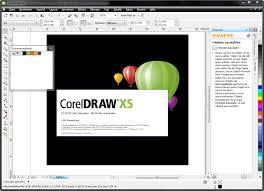 CorelDRAW is licensed as Shareware for the Windows operating system / platform from graphics editors and can be used as a free trial until the trial period ends (after 30 days). The CorelDRAW X5 demo is available to all software users as a free download (Shareware) with potential restrictions and is not necessarily the download of the full version.
Version History Old versions of CorelDRAW Current version CorelDRAW X5 (583.27 MB) Release status Major release with feature updates.
Version: VX5 Distributed as EXE (Windows Executable) Found with CorelDRAW has most often been found with Corel Draw Free Download Full Version, Download Corel Draw X5, Coreldraw X5Free Trial and Full Download Corel Draw.
It may also be found on other sites such as cnet download.com or Softpedia. Compatible with Windows 7, Windows Vista, Windows XP
License and Usage What you can and cannot do with CorelDRAW Released as Full Version / Shareware (Free Trial) Restrictions 30 day free trial. This is the CorelDRAW demo version. EULA Corel Corporation includes an EULA which must be accepted in order to complete installation. Pricetag $499 (USD)
Details for CorelDRAW: Filesize: 583.27 MB Filename: CorelDRAWGraphicsSuiteX5Installer_EN.exe Virus/malware test: Virus-free Last modified: 26 May 2011 Operating system: Windows HTTP code: 200
DOWNLOADS-
 Corel DRAW GRAPHICS SUITE X5 Free Trail Version Download
What is CorelDRAW?
CorelDRAW is an image editing application which was originally the most popular back in the days of Windows 95 and started to fade with the upcoming popularity of the Internet and world-wide web.
If you're looking for a program which is versatile and able to work with many different types of graphics, then CorelDRAW might just be what you're looking for.
Back in the day, CorelDRAW was almost on the same footing as Adobe Photoshop when it came to graphics editing, but it kind of just faded into history and nobody has heard that much about it when you consider the explosion of different graphics editors in today's age. With that said though, CorelDRAW still has a loyal following of users.
Corel is specifically an image editor capable of dealing with and editing vector graphics and can also handle JPEG, PNG and other popular formats. It is highly adaptable for working with illustrator-type projects and is also suitable for web designers. You can create web graphics, vector images, high quality animations or edit photographs.
CorelDRAW also comes with some neat and useful utilities including Corel CONNECT, Corel PHOTO-PAINT, Corel CAPTURE and Corel PowerTRACE. All tools which help you organize, search, edit, take screen captures and convert bitmaps into vector images.
One good thing to note is that there are several different sites online which post useful CorelDRAW tutorials which provide useful tips. There are also different brushes and filters which you can download in order to increase the functionality of this image editor. You can also apply the core CorelDRAW effects to images without installing third-party plugins.
The software download is perfect not only for those getting their feet wet with web design, but also those who have a history and experience with graphics design; especially those who actually know what a vector object is.
This program functions as a full version for 30 days until you're asked to provide an activation key. You can request the key from Corel after you have completed the purchase of the program. Taking a nod from Adobe's Photoshop suite, Corel also offers a discounted student version.
CorelDRAW can add text to an image, apply special effects to a picture, create animated GIFs, create PNG graphics, create web graphics and create and edit layers.
| Version History | Old versions of CorelDRAW |
| Current version | CorelDRAW X5 (583.27 MB) |
| Release status | Major release with feature updates. Version: VX5 |
| Distributed as | EXE (Windows Executable) |
| Found with | CorelDRAW has most often been found with Corel Draw Free Download Full Version, Download Corel Draw X5, Coreldraw X5Free Trial and Full Download Corel Draw. It may also be found on other sites such as cnet download.com or Softpedia. |
| Compatible with | Windows 7, Windows Vista, Windows XP |
| License and Usage | What you can and cannot do with CorelDRAW |
| Released as | Full Version / Shareware (Free Trial) |
| Restrictions | 30 day free trial. This is the CorelDRAW demo version. |
| EULA | Corel Corporation includes an EULA which must be accepted in order to complete installation. |
| Pricetag | $499 (USD) |
| Details for CorelDRAW: | |
| Filesize: | 583.27 MB |
| Filename: | CorelDRAWGraphicsSuiteX5Installer_EN.exe |
| Virus/malware test: | Virus-free |
| Last modified: | 26 May 2011 |
| Operating system: | Windows |
| HTTP code: | 200 |
DOWNLOADS-
Sunday, March 30, 2014
Sunday, March 30, 2014
- 0 Comments
Ashampoo Burning Studio 14.0.4
Free Full Version Download [Modded]

Ashampoo Burning Studio 14 is a multi-award winning all-purpose burning and multimedia software.
The new suite is easier to use, more powerful and totally reliable – experience the best Burning Studio ever made! Ashampoo Burning Studio 14 can handle all your data, audio and video burning and authoring tasks, without sacrificing its famous ease of use.
The software lets you burn data files, music, photos and videos to CD, DVD and Blu-ray disc. Also you can backup and protect sensitive data with file encryption. Ashampoo Burning Studio 14 enables you to make perfect copies of your CDs, DVDs and Blu-ray discs. Author and create movie and slideshow discs in HD quality. Create audio discs and design your own booklets and covers. Besides you can browse and create disc images.
All the authoring tools have been overhauled and the video encoding quality is even better than before.
You can use the integrated editor for building DVD and Blu-ray video disks with menus. The program also starts more quickly and is generally snappier to use.
With Autoplay Editor module you can build auto-starting data discs with attractive interactive menus – for example for collections of programs.
Ashampoo Burning Studio 14 Features:
Burning:
• CD, DVD, Blu-ray
• Data, music and video discs
• Single- and multi-session recording
• Autostart and bootable discs
• Disc-spanning to spread data across many discs automatically
• ISO, Joliet and UDF file system support
• AES-256 disc encryption
• CD, DVD, Blu-ray
• Data, music and video discs
• Single- and multi-session recording
• Autostart and bootable discs
• Disc-spanning to spread data across many discs automatically
• ISO, Joliet and UDF file system support
• AES-256 disc encryption

Backup:
• Password protection
• File compression
• User-definable data splitting
• Mobile device backups at the click of a button, supports all common devices (flash drives, smartphones, tablets)
• Password protection
• File compression
• User-definable data splitting
• Mobile device backups at the click of a button, supports all common devices (flash drives, smartphones, tablets)
Multimedia:
• Movie and slideshow editor with themes, logos, subtitles, transitions and background music
• Disc menu editor with themes, music, individual pages and templates
• Audio CD/MP3/WMA discs with designable booklets and covers
• Audio disc ripping with automatic cover artwork retrieval
• Movie and slideshow editor with themes, logos, subtitles, transitions and background music
• Disc menu editor with themes, music, individual pages and templates
• Audio CD/MP3/WMA discs with designable booklets and covers
• Audio disc ripping with automatic cover artwork retrieval
Other:
• 1:1 disc copy, modified copy
• Create/browse disc images (ASHDISC, CUE/BIN, ISO)
• Cover Designer, supports themes, images, texts, tables, shapes, scanning
• 1:1 disc copy, modified copy
• Create/browse disc images (ASHDISC, CUE/BIN, ISO)
• Cover Designer, supports themes, images, texts, tables, shapes, scanning
Operating Systems:
Windows XP, Vista, Windows 7, Windows 8 (32-bit & 64-bit).
This software requires Microsoft .NET Framework 4.0.
What’s New in Ashampoo Burning Studio 14.0.0:
* Protect sensitive data against prying eyes with disc encryption: You’re private data should remain exactly that, private! In Ashampoo Burning Studio 14, we’ve built in industry-standard disc encryption so your data stays accessible only to you.
* Rip audio discs in style: During disc ripping, Ashampoo Burning Studio 14 automatically find the best cover artwork for your tracks so you don’t have to.
* Backup mobile devices at the click of a button: With Ashampoo Burning Studio 14, you no longer have to manually copy files such as images from your tablet or smartphone to your PC. Just plug it and click – Ashampoo Burning Studio 14 will do the work. All common devices including Android and Apple smartphones and tablets (iPod, iPhone, iPad) are supported.
* Get work done quicker with powerful user interface enhancements: Ashampoo Burning Studio 14 includes numerous enhancements that make your life easier. This includes smart file chooser dialogs that display only files relevant to the current task, virtual tree structures that provide a hierarchy view for folders to be burned and various other enhancements.
Homepage – http://www.ashampoo.com
Download Links:-
- Download Ashampoo Burning Studio 14.0.4.2 – Multi-Language
- Download Ashampoo Burning Studio 14.0.4.2 – Multi-Language (Portable Version)
Subscribe to:
Posts (Atom)