
Recent Articles
Showing posts with label Windows XP. Show all posts
Showing posts with label Windows XP. Show all posts
Friday, May 16, 2014
Friday, May 16, 2014
- 0 Comments

AVG Anti-Virus Definitions May 16,2014 Updater
Hello Friends , Welcome back to Digi Hackers...
Today I want to give you a special updater that is...
AVG Anti-Virus Definitions Updater of today i.e. 16th May 2014
Well guys this is our first definitions updater so be calm and enjoy
This one is for AVG Anti-Virus owners...
AVG Anti-Virus Definitions description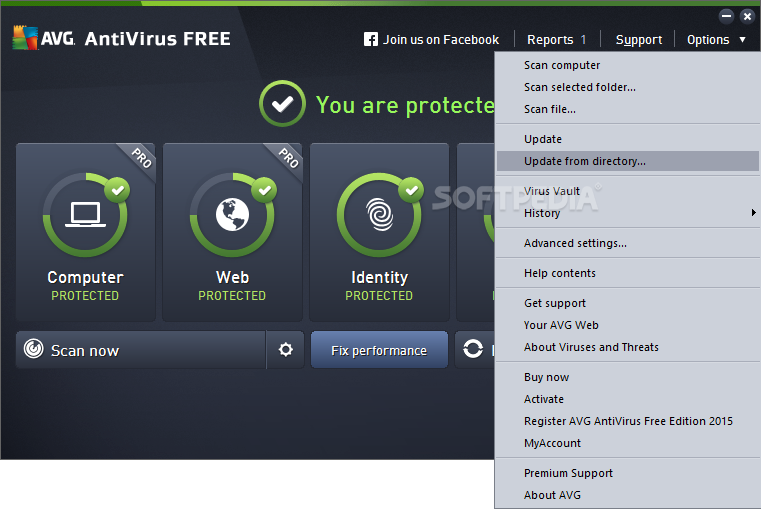 Latest free virus definitons for AVG AntiVirus
In order to provide the highest level of antivirus protection for users of AVG Anti-Virus, GRISOFT continuously develops information about new viruses.
These downloads are for our new version AVG 8.0Download Latest AVG Anti-Virus Here This information, as well as product improvements, is provided to the users
of AVG Anti-Virus in the form of Updates.
Timely virus database updates are the critical component for the effectiveness
of any antivirus program. In order to ensure that your AVG is providing the maximum amount of antivirus protection, your AVG Anti-Virus System must be kept up-to-date.
Save update to a temporary location, open AVG control center, select the update button at the bottom, then the select folder button, and follow the prompts. NOTE: It is strongly recommended that you perform all updates from the AVG Anti-Virus interface. The program can distinguish between full and differential updates; while this page offers only full update files for download.
Downloads:-
TOTAL SIZE/OS SUPPORTED 81.5 / SUPPORTED FOR EVERY VERSION OF WINDOWS |
Saturday, April 26, 2014
Saturday, April 26, 2014
- 0 Comments
Top 20 Websites To Learn Programming Languages and Coding Online
Hello Friends, Hope You all are fine
After may be 2-3 days back with a new post guys and this helpful post is also my favorite , so I'll try my best in making this post awesome!!!
Lets Start...
Wednesday, April 23, 2014
Wednesday, April 23, 2014
- 0 Comments
Download Candy Crush Saga for Pc [Windows Xp/Vista/7/8/8.1/Mac OSx]

Hello Friends,
In this post I am going to provide you with Candy Crush Saga for pc with Bluestacks
Candy crush saga is one of the most awesome games which are now trending in the pc games. This candy crush saga game is a simple game which is loved by all pc users, mobile users. The concept of the candy crush saga is nothing but to join the three candy of same color or same kind. This game has nearly 515 levels with some bonus levels to boost you up. This game is now mostly getting downloaded to be used in pc. So here I’m giving you the most downloaded pc version of candy crush saga game.
STEPS FOR DOWNLOADING CANDY CRUSH SAGA FOR PC
Please follow the below steps to make candy crush saga work properly for windows 7/8/8.1 or Mac
METHOD 1
- First of all in order to install candy crush saga in pc we need to install the bluestacks application in your pc.
- After installing bluestacks application we have to search for the exact keyword in thebluestacks ‘Candy crush saga'
- Now you will get the name in the bluestacks emulator.Download the game on the pc
- Now you have just downloaded and installed candy crush saga for laptop.
METHOD 2
Use this method if you have already installed the bluestack in your pc/laptop/ desktop
1) Just search and download the apk file of candy crush saga in the internet and download it and install to your laptop/ pc/ desktop.
1) Just search and download the apk file of candy crush saga in the internet and download it and install to your laptop/ pc/ desktop.
CANDY CRUSH SAGA ADVANTAGE BY DIGI HACKERS
You love the candy crush saga game but you don’t have the life or move to play continually many levels then don’t worry. I have a solution for you to play candy crush saga in pc.
Here we give you the candy crush saga for free download with unlimited lives, moves and boosters.
Here we give you the candy crush saga for free download with unlimited lives, moves and boosters.
OK SO AFTER INSTALLING BLUESTACKS
Wednesday, April 09, 2014
Wednesday, April 09, 2014
- 0 Comments
SECURITY TIPS AND COUNTERMEASURES AGAINST MOST OF THE HACKING TECHNIQUES
Hello friends, Well as you all know that this page is for Ethical hacking purpose too and most of our viewers are also good CEH
But If any one hurts someone by hacking them for their enjoyment and to show their power , then it totally **WRONG**
| HACKERS ALWAYS KEEP AN EYE ON YOU (VICTIM) |
Well My this post is for those who are not aware of hacking and sometime get trapped in hacking..,
Today I will give some Security Tips against various hacking techniques by which you can protect your self from bad -black hats....
Password Hacking
- Guessing the password
To avoid password guessing attack do not keep your password such as your date of
birth, your fathers name etc.
- Guessing the Secret answer
Don’t keep your secret answer too simple.
For example if your secret question is
“What's your Mother's birth place?” Now if the has some information about you
he can easily guess it. I recommend you keep the your secret answer as complicated
as possible.
- Social Engineering
Social Engineering attacks are really difficult to avoid, but however there are several
methods to avoid it.
1. Never give your password or your personal information to any company
representative unless and until your are sure about his/her identity.
2. Employees from companies from like Google , youtube, Hotmail etc will never ask
for your password.
3. Never assume that Phone call which appears to come from an organization is
original
4. If you are unsure that Email is original verify it by contacting the company.
- Phishing
Almost 80% of email accounts are hacked by this method the below steps
will help you to successfully avoid being victim of Phishing attack.
1. If you are an Internet explorer use I recommend you to use a Phishing filter it will
alert you every time you come across a Fake login page or Phisher site.
2. If you are a firefox user I recommend you using a firefox addon Secure login
What secure login does is it automatically skips the fake pages and hence securing
you from all kinds of Phishing Attacks.
3. Remember If on a secure page, look for “https” at the beginning of the URL and
the padlock icon in the browser.
4. Sites like paypal, Alertpay, Money Bookers will always call you with name instead
of “Dear Paypal user”, “Dear Valued customer” or other names like that.
Here are a few phrases to look for if you think an e-mail message is a phishing scam
1. Verify or update your account.
2. You have won a lottery.
3. If you don’t respond or update your information your account will be
closed in 24 hours.
- Link Manipulation
To avoid being a victim of a Link manipulation attack always check the url of the
page before logging.
For example if you are logging into a Facebook account firstly check the url of the
phisher site may look like www.facebok.com or www.facebuk.com or something
like that.
Alternatively you can use Phishing filter or Secure logging to protect your
self from a Link manipulation attack.
- Desktop Phishing
To protect your self from being a victim of Desktop Phishing I recommend you using
the a program called Macros.
As you know that In desktop Phishing the hackers
replace your Windows/System32/drivers/etc/hosts
What Macros does is it protects your host files, which prevents the desktop
phishing attack.
Tab Nabbing
The easiest way to avoid a tabnabbing attack is using firefox or chrome secure login and
Phishing filter.
Keylogging
Keylogging is a easy to avoid if you have a good antivirus program installed.
However some skilled hackers use some methods like Crypting, Hexing,
Filepumping etc to make it hard for antivirus programs to detect it.
So Antivirus alone
wont protect you from keylogging you need a good antispyware program such as
Spyware cease or Noadware. You can also use some anti logging programs such as
For Firefox users I recommend you using Keyscrambler.
Keyscrambler is a unique antilogging program which scrambles your keystrokes so
the attacker will get the wrong keystrokes.
Password Cracking
- Brute force and Rainbow tables
Brute force attacks and Rainbow tables attacks can be avoided by keeping a very long
and strong password. A strong password contains both lower case and upper case
alphabets also numbers and special characters.
However there is a website
www.strongpasswordgenerator.com which automatically generates a strong
password for you.
- Dictionary Attacks
In order to avoid a Dictionary attacks avoid keeping passwords which are already
present in dictionary such as immortal, cash, book etc.
Windows Hacking
- Netbios Hacking
To keep your computer safe from Netbios attacks make sure that File and Printer
sharing is disabled. In windows vista and latest versions the File and Printer sharing is disabled by
default, but in windows xp you need to disable it manually.
Follow the below steps to protect your computer from Netbios attacks:
1. Goto Start → Control panel → Network Connections
2. Double Click on the active connection
3. Click on Properties
4. Uncheck the “File and Printer sharing sharing for Microsoft
Networks” option.
Wireless(Wi-Fi) Hacking
- ARP Poisoning Attack
Arpon (Arp Handler Inspection) is a portable handler daemon which protects that
makes ARP secure to avoid ARP Poisoning attacks.
You also need to you a strong
firewall such as zonealaram and commodo I personally recommend you using
commodo firewall because it works best with ARP attacks by default ARP protection
is disabled in commodo firewall you need to enable it, to enable it:-

Click on Firewall at
the top bar and then
Click Advanced button at the left pane.
Go to Attack Detection Settings and
check “Protect the ARP Cache”
- Packet Sniffing
To prevent packet sniffing attack make sure that the sites important to you use SSL
Encryption. If SSL encryption is enabled the url will begin with https:// instead of
http://.
Website Hacking
- SQL Injection
SQL Injection occurs when your web form accept special characters.
The best way to
avoid SQL Injection attack is to disallow spaces and special characters.
- Cross Site Scripting
A Cross Site scripting attack can be prevented by following the steps below:-
1. Encode output based on input parameters.
2. Filter input parameters for special characters.
3. Filter output based on input parameters for special characters.
Remote File Inclusion
A Remote File Inclusion attack can be avoided by disabling register_globals and
allow_url_open in your sever php.ini file.
Local File Inclusion
Local File Inclusion attacks can be avoided by good coding practices and also by
disallowing any scripts to be uploaded on your server.
DDOS Attacks
Its truly very difficult to avoid a DDOS attacks web giants like Google , Yahoo and
Twitter have also been the victim of this attack.
I suggest you to look for some
services which could help you fight with this attack.
Malware and Rats
The easiest way to avoid getting infected with Malware you need to install a good
Antivirus and a good firewou all.
For PC's with low configuration I recommend you
using Avira or AVG antivirus and for computers with high configuration I
recommend you using Avast , Norton, kaspersky or Mcafee Antivirus.
So Friends , Hope you liked this post and thank you for reading this
BE COOL
BE SAFE!!
BE SAFE!!
Monday, April 07, 2014
Monday, April 07, 2014
- 0 Comments
7 COOL AND USEFUL THINGS YOU CAN DO WITH YOUR "PENDRIVE"
Hello Friends , Lets Start....
Well Transporting your data is probably the most common use for a USB flash drive.
But there's a world of other things you can do with these handy pocket-size drives.
Here are 7 ways you can use that USB flash drive to do more than simply just move data.
In addition to storing your data, you can run portable applications from a USB flash drive. For example, OpenOffice, which is a complete office suite that includes a word processor, spreadsheet, presentation tool, drawing package, and database, is available as a portable application.
Mozilla Firefox and Thunderbird are also available as portable applications. When you combine the office suite with the ability to surf the Web and check email, you'll be able to take your most vital computing applications with you wherever you go -- right in your pocket.
If that's not enough, you can choose other applications to install on your USB flash drive from Here . You can even install an entire prepackaged suite of applications that includes such things as an audio player, games, an antivirus utility, and a handy menu system.
If you want to do more than just run your own applications, you might want to consider booting an entire operating system from your USB flash drive.
You can boot either Windows or Linux from a USB flash drive;
However, the process is not an exact science and you may be in for a technical adventure.
Fortunately, there are some guides you can follow.
To learn how to , search this article on Google.com or Techgyd.com
Creating a bootable USB flash drive for Windows XP.
Puppy Linux teaches an old dog new tricks.
If you have a wireless network, you can use the Wireless Network Setup Wizard in Windows XP or the Windows Connect Now (WCN) feature built into Vista to save wireless network configuration information to a USB flash drive.
You can then use your drive to quickly and easily connect another computer or a WCN-compatible device, such as a router or printer, to your wireless network. To learn more about using the Wireless Network Setup Wizard, see the Help And Support Center, which is accessible from Windows XP's Start menu.
To learn more about using the Windows Connect Now feature, see Windows Help And Support, which is accessible from Windows Vista's Start menu.
A password reset disk can really come in handy if you forget the password to your user account on a Windows system that is not a part of a domain.
If you find yourself in that situation, you can use the password reset disk to reset your password and quickly get back into your user account.
In Windows Vista, you can use USB flash drive rather than a floppy disk as a password reset disk. For details on how to do so, see the article on techgyd.com
for "Create a Vista password reset disk using a USB flash drive."
If you're running Windows Vista or Windows 7 or even Windows 8 , 8.1 ,then you can use a USB flash drive to speed up your system with the ReadyBoost technology.
ReadyBoost can use the storage space on a USB Flash drive as an additional memory cache to aid the memory cache on your hard disk.
And because flash memory is more responsive than a hard disk, with its physical moving parts, the memory cache provided by ReadyBoost can significantly improve system responsiveness.
Using ReadyBoost is easy. You just insert your USB flash drive into your Vista system and follow the onscreen prompts to configure and use ReadyBoost.
If all you really want to do with your USB flash drive is transport data, and you're running Windows XP, you can do so more efficiently with the Microsoft USB Flash Drive Manager.
Once you have installed this manager, you can easily copy files to and from your drive, back up and restore the entire flash drive to and from your hard disk, change the drive label, and even create an autorun.inf file to launch Drive Manager automatically when you plug in the drive.
To learn more about and download the USB Flash Drive Manager visit the Microsoft TechNet Magazine site.
Would you like to be listening to music when you're using a computer at the office, but you don't have an MP3 player?
If so, then you can use a USB flash drive as an MP3 player along with Windows Media Player and a set of headphones.
Just copy your MP3 files to your USB flash drive, plug it into your computer, and direct Windows Media Player to build a library of the songs on your drive.
You can use all of Windows Media Player's playback features, such as playlists and favorites, to easily customize your music listening experience. And best of all, you won't have to worry about running low on battery power.
Well Transporting your data is probably the most common use for a USB flash drive.
But there's a world of other things you can do with these handy pocket-size drives.
Here are 7 ways you can use that USB flash drive to do more than simply just move data.
- 1: Run portable applications
In addition to storing your data, you can run portable applications from a USB flash drive. For example, OpenOffice, which is a complete office suite that includes a word processor, spreadsheet, presentation tool, drawing package, and database, is available as a portable application.
Mozilla Firefox and Thunderbird are also available as portable applications. When you combine the office suite with the ability to surf the Web and check email, you'll be able to take your most vital computing applications with you wherever you go -- right in your pocket.
If that's not enough, you can choose other applications to install on your USB flash drive from Here . You can even install an entire prepackaged suite of applications that includes such things as an audio player, games, an antivirus utility, and a handy menu system.
- 2: Boot an operating system
If you want to do more than just run your own applications, you might want to consider booting an entire operating system from your USB flash drive.
You can boot either Windows or Linux from a USB flash drive;
However, the process is not an exact science and you may be in for a technical adventure.
Fortunately, there are some guides you can follow.
To learn how to , search this article on Google.com or Techgyd.com
Creating a bootable USB flash drive for Windows XP.
Puppy Linux teaches an old dog new tricks.
- 3: Connect to a wireless network
If you have a wireless network, you can use the Wireless Network Setup Wizard in Windows XP or the Windows Connect Now (WCN) feature built into Vista to save wireless network configuration information to a USB flash drive.
You can then use your drive to quickly and easily connect another computer or a WCN-compatible device, such as a router or printer, to your wireless network. To learn more about using the Wireless Network Setup Wizard, see the Help And Support Center, which is accessible from Windows XP's Start menu.
To learn more about using the Windows Connect Now feature, see Windows Help And Support, which is accessible from Windows Vista's Start menu.
- 4: Create a password reset disk
A password reset disk can really come in handy if you forget the password to your user account on a Windows system that is not a part of a domain.
If you find yourself in that situation, you can use the password reset disk to reset your password and quickly get back into your user account.
In Windows Vista, you can use USB flash drive rather than a floppy disk as a password reset disk. For details on how to do so, see the article on techgyd.com
for "Create a Vista password reset disk using a USB flash drive."
- 5: Boost Performance
If you're running Windows Vista or Windows 7 or even Windows 8 , 8.1 ,then you can use a USB flash drive to speed up your system with the ReadyBoost technology.
ReadyBoost can use the storage space on a USB Flash drive as an additional memory cache to aid the memory cache on your hard disk.
And because flash memory is more responsive than a hard disk, with its physical moving parts, the memory cache provided by ReadyBoost can significantly improve system responsiveness.
Using ReadyBoost is easy. You just insert your USB flash drive into your Vista system and follow the onscreen prompts to configure and use ReadyBoost.
- 6: Manage it
If all you really want to do with your USB flash drive is transport data, and you're running Windows XP, you can do so more efficiently with the Microsoft USB Flash Drive Manager.
Once you have installed this manager, you can easily copy files to and from your drive, back up and restore the entire flash drive to and from your hard disk, change the drive label, and even create an autorun.inf file to launch Drive Manager automatically when you plug in the drive.
To learn more about and download the USB Flash Drive Manager visit the Microsoft TechNet Magazine site.
- 7: Use it as an MP3 player
Would you like to be listening to music when you're using a computer at the office, but you don't have an MP3 player?
If so, then you can use a USB flash drive as an MP3 player along with Windows Media Player and a set of headphones.
Just copy your MP3 files to your USB flash drive, plug it into your computer, and direct Windows Media Player to build a library of the songs on your drive.
You can use all of Windows Media Player's playback features, such as playlists and favorites, to easily customize your music listening experience. And best of all, you won't have to worry about running low on battery power.
Thursday, April 03, 2014
Thursday, April 03, 2014
- 0 Comments

BEST ICONS COLLECTION FOR WINDOWS ALL [NEW ARRIVALS]
Hello Friends , Hope you all are Fine.....
So Friends Are you tired of Old Icons In your Windows and Wanna Change it to Some New Look ??
Today I Am Going to Update Some Good Icons Collections for Windows System.
As We know that in Windows 7 , Their are so many Built - in High Graphics Icons , but do you want those icons which you often see in games and most of apps ????
May be everyone's answer should a big "YES!!!"
1) Free Games Icons 2013.2
Free Game Icons description:-A free icon set for game and gaming website developers
This free icon set of Free Game Icons offers game developers a variety of images that will come
handy for all the kinds of computer games you can imagine.
It includes icons for Lock, Door, Apple, Chain, Jester, Wizard, and many more.
All the images provided come in three sizes (32x32, 48x48 and 64x64 pixels) and in a True Color color format with a semi-transparency alpha channel. These items come as PNGs that feature a transparent background.
There are many different ways to get icons for your application. One of them is to design those icons yourself using one of the widely available icon-editing programs.
But that could be a hard task, if your drawing skills are low or not present at all.
The other way is to use a search engine and get the icons free of charge from someone,who does have some drawing skill and therefore, managed to create the icons and put them on the net.
There is only one problem with those icons - their quality.
|

Tuesday, April 01, 2014
Tuesday, April 01, 2014
- 1 Comment
Internet Download Manager (IDM) 6.19 build 3 with Crack and Patch
 Internet download manager (IDM) is a very useful download acceleration tool with file segmentation technology to accelerate your downloads of video, music, document and other important files.
IDM increases download speed by up to five times with resume and schedule capacity. Comprehensive error recovery and resume capability will restart broken or interrupted downloads due to lost connections,network problems , computer shutdowns, or unexpected power outages are outstanding for individuals.

Seamless integration into major browser like Microsoft Internet Explorer, Firefox, Google Chrome, Opera is considered to be very useful and through which IDM handles your downloads automatically.
Step 1 :- Install the Latest Version of IDM from their Official Website below :-
Step 2 :- Download the Latest Patch from below :--
Step Three: Follow Instructions Below
- Install IDM downloaded from official site
- Cancel/Close all massage from IDM about fake serial and bla bla bla :)
- Close IDM from system trey if it is still open (IDM must be closed during patching process)
- Open Patch file by clicking on "Patch (New) - IDM 6.19.exe" and click OK if it shows any warning, a new windows will open with music;
- Click on "Patch" button and show IDM "Program File", it is normally C:\Program Files\Internet Download Manager;
- Select IDman.exe and Click OK, Patching is done!
- Now click on "AutoReg" button and then exit. Enjoy...!!!
Thank You Friends for Reading It ....
If you Like it then do us a Favor ,
Share our Posts and Site
If you Like it then do us a Favor ,
Share our Posts and Site
Credits:- Prophet Hacker
Subscribe to:
Posts (Atom)